
Look around your building. Every door, camera, and intercom is now part of your network - these access control software and security camera systems quietly behave like small computers. They sit on your network, talk to your servers and often reach out to cloud services. If they are weak, out of date or badly set up, they are not only a safety problem at the front door. They are also a way into the rest of your technology.
That is why many CISOs and CIOs now find physical security sitting quietly under their portfolio.
For years, people thought of "physical security" as keys, locks and a scary guard in a hi-res vest. Today, it is readers, controllers, cameras, and apps. That change is why many technology leaders now find the security office sitting on their chart. Ready or not, the door has joined the data center.
Think of this post as your friendly guide to what just landed in your lap.
Key takeaways
- Physical security is now an IT risk, not just a facilities concern
- Modern physical security systems should be governed like core IT infrastructure
- Physical security data is a valuable business asset, not just a safety tool
- Converged security demands shared governance between IT and facilities
Your Building Is Full of Small Computers
Most modern security equipment is really just a computer in a different shape.
- Door controllers are network devices that make decisions about who can enter, and biometric access control adds another layer of security.
- Card readers and keypads send data about the person at the door.
- Cameras stream video over the same cables as your laptops.
- Intercoms use the network to send voice, open doors and trigger events.
Add in cloud connections, mobile apps, and remote support and one truth becomes clear: your "physical" security now behaves a lot like the rest of your technology.
Treat these devices like you treat servers and laptops. Identify them, patch them, back them up, and monitor them with the same care.
If you are proud of your firewall but the door controller is using the default password from 2014, you can guess where an attacker will start. An attacker does not care whether they come in through a web server or a warehouse door, as long as they end up in your data. Consider layered authentications such as biometric access control where appropriate.
The Four Pillars of Modern Physical Security
To get your bearings, it helps to split physical security into four main areas.
Intruder alarm systems
Intruder alarms watch for unauthorized movement, open doors, or broken glass when areas should be empty. They use sensors on doors and windows, movement detectors in rooms and sometimes special sensors for things like vibration.
When something looks wrong, they raise an alarm. That alarm might ring a siren, notify a monitoring center, or send an alert to a phone. As part of a broader integrated security system, these alarm panels should be inventoried, updated, and monitored like any other endpoint.
Access control systems
Access control decides who can go where, and when. Instead of keys, people use cards, tokens, or mobile credentials. When they present it at a reader, the system checks if that person is allowed to open that door at that time.
If the rules say "yes," the door opens and the system records an event like, "Alex entered main door at 08:41." If the rules say "no," the door stays locked, the person may see a message on the reader and the system records a denied event.
Controllers make real-time decisions, log events, and sync with a central database.
Video surveillance
Once upon a time, you had a pile of tapes in the back room. Today’s video surveillance systems and security camera systems stream video over the same cables as your laptops to servers.
Operators view live feeds or play back recorded clips. Increasingly, software helps spot unusual behavior, count people, or focus on areas of interest.
The key point for you: these cameras and recorders are networked devices that need the same basic care as any other small computer.
Perimeter detection
Perimeter protection covers fences, gates, yards, and car parks. It can include:
- Sensors in the fence that feel cutting or climbing
- Ground sensors that feel footsteps or vehicles
- Beams that trigger if someone walks through them
- Long-range cameras watching open areas
Perimeter security systems are common around critical infrastructure and high-security sites and buys you time - detect early, respond quickly, and keep threats at bay.
For technology leaders, the key idea is simple: each pillar runs on devices, software, and data that deserve the same standards you already apply to servers and applications.
The Data You Can Unlock
Physical security is not only about stopping threats. Every badge swipe and door event is a data point. When combined with other systems, it can drive efficiency and a better experience for everyone in the building. For CIOs and IT leaders, this is where physical security stops being a cost center and starts acting like a data source for energy, space, and cost conversations by:
- Linking access events with heating, ventilation and lighting to save energy when areas are empty.
- Using real occupancy to right size catering and cleaning schedules.
- Giving health and safety teams live muster lists in an evacuation.
- Enabling space planning with accurate use reports instead of guesswork.
- Supporting charge back by linking time on site to cost centers.
In high-value facilities, this approach is increasingly expected and aligned with industry best practice. Frameworks such as ISO 27001 emphasize the importance of controlling access, protecting equipment, and monitoring environmental conditions as part of a holistic Information Security Management System.
This series will dive deeper into turning these signals into insight. The aim is to help you make simple, smart moves that deliver fast value and reduce risk.
Why Governance Must Include Physical Security
Physical security often grew up in a separate corner of the organization. Facilities or property teams chose the systems, arranged the installation, and called the vendor when something broke. The technology team was only invited in when a new cable was needed.
This is the world of converged security, where physical and cyber risks now share the same devices, data, and teams.
Common issues include:
- Unknown devices on the network, installed years ago
- Old software that has never been updated
- Shared or default passwords still in place
- Flat networks where a camera can reach critical servers
- No clear backup or recovery plan if a key server fails
In other words, all the problems you spent years fixing in other parts of the environment.
The fix is not to take everything away from the facilities team. They still understand the spaces, the flow of people, and the safety rules. Instead, you need shared governance. That means agreeing on who owns the risk, who approves changes, and how standards are set.
Why IT Leaders Should Care: Key Risk Implications and Business Value
Risk implications to highlight
- Network exposure through physical devices: Unpatched or default-credential devices, like a legacy controller or camera, can become an attacker’s first foothold. Physical devices can provide opportunities into sensitive systems.
- Compliance and audit exposure: Physical systems now hold logs, video, and credentials that fall under IT security, privacy, and audit obligations. Standards such as ISO 27001 Annex A.11 (Physical & Environmental Security) require organizations to manage physical access, protect hardware, and maintain secure perimeters. Poor physical governance risks audit findings and reputational impact.
- Operational disruption: If access control servers fail without tested recovery processes, critical spaces may become inaccessible. A failed video surveillance system can also affect investigations or safety procedures.
- Data privacy risks: Access control logs and video feeds contain identifiable information. Poorly secured systems increase the chance of privacy breaches.
- Unknown or legacy devices: Older controllers or cameras that predate IT involvement may be unsupported or unpatched, creating blind spots in asset management and vulnerability scanning.
Business values for IT leaders
- Cost efficiency and better decision-making through better data: Combining access events and occupancy data with IT data unlocks patterns around workforce behavior, resource utilization, and site optimization which helps optimize energy usage, operational planning, reducing waste and improving building efficiency.
- Greater operational resilience: Treating security systems like IT systems means fewer outages, faster recovery, and more predictable operations across the business.
- Enhanced safety and compliance: Better insight into user movements improve emergency response, reporting, and regulatory alignment.
- Stronger strategic positioning: Bringing physical security into IT governance shows alignment with modern operating models and reinforces IT’s role as enabler across cyber, physical, and operational landscapes.
Treat Doors And Cameras Like Any Other Tech
The good news is that most of what you need to do will feel familiar. You already have methods for handling servers, laptops, and cloud services.
You can extend those habits to physical security:
- Asset management: Put devices in your asset register so you know what you have.
- Named ownership: Assign product owners who can approve changes.
- Patch management: Schedule firmware/software updates, include “maintenance windows” for access control systems, and security camera systems.
- Backups: Include key systems in your backup and recovery tests.
- Review: Bring them into your regular risk and architecture reviews.
In short, aim for "boring and well managed." If a new door controller feels like a mystery box, something is wrong.
A Quick Starter Checklist
If physical security has just landed in your world, here is a short checklist you can work through with your colleagues in the facilities department.
- Map devices
- List your sites and inventory including door controllers, cameras, recorders, and alarm panels.
- Note where each device connects to the network and identify cloud dependencies (eg: cloud access control).
- Assign ownership
- Decide who owns the overall security system.
- Decide who owns each part: alarms, doors, cameras, perimeter.
- Write this down and share it.
- Bring systems into patch cycles
- Find out how software and firmware updates are delivered.
- Agree on a regular window for updates and track results; include key servers in backup and recovery tests
- Check that databases and configuration files are backed up.
- Run a simple restore test to a spare server or virtual machine.
- Record the results and any gaps.
None of this is glamorous. It is the same kind of basic hygiene that protects everything else. That is exactly why it works.
One Picture to Share with the Team
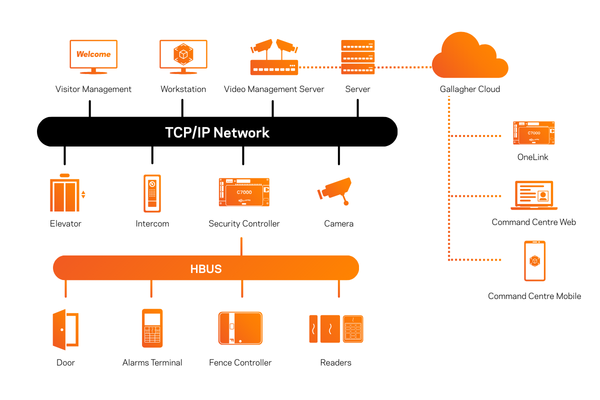
If you like diagrams, draw a simple network map with your usual devices in one color and your physical security devices in another.
Include:
- Controllers
- Cameras
- Alarm panels
- Recorders and servers
- Any cloud services they talk to
Then show the paths they take through your network. It is a quick way to explain to non-technical colleagues why "just putting it on the nearest switch" may not be the best idea. It becomes a simple security architecture sketch you can use in risk reviews and board packs.
Two Small Actions to Take This Week
One for the technology team: pick one site and add every controller, camera, recorder, and alarm panel you can find to your asset register. Even a rough first pass is a big step forward.
One for the facilities team: do a walkthrough of the same site with your technology partner and mark which doors, areas, and systems are most critical to daily operations. Use that list to agree shared priorities.
That is it for part one. Your building has more in common with your data center than you might think, and your doors are no longer simple bits of metal. In the next post, we will look more closely at how your systems create data and how to turn that into useful insight for the business.
Read the next blog in this series: A CIO Guide to Access Control and Security Data