Release Notes December 2025
Quick View for Cardholders
Available on: Desktop
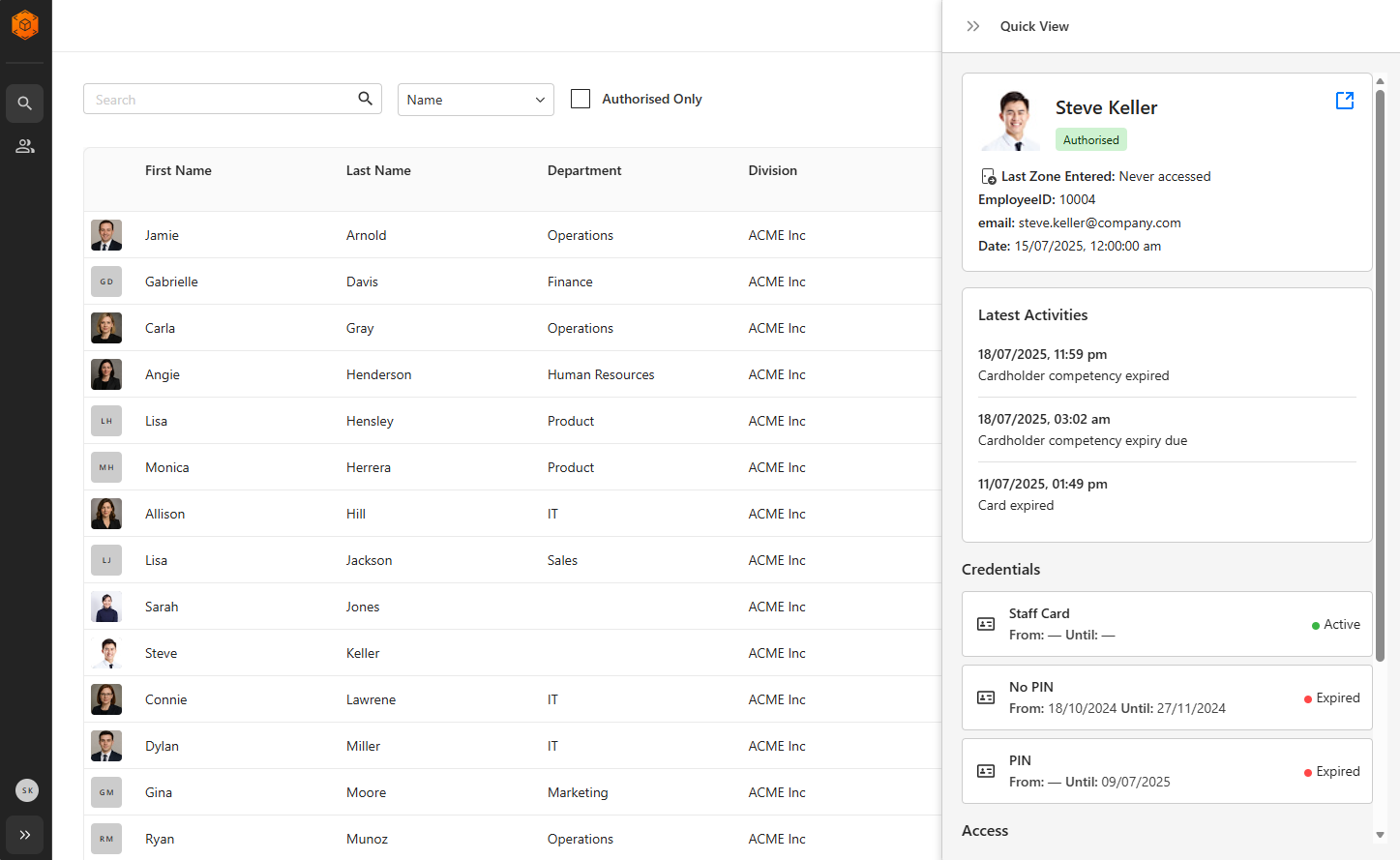
We’ve introduced Quick View, a streamlined way to confirm cardholder information without needing to open the full record.
Why we built it
Operators often need to scan through multiple cardholders to find the right one. Quick View helps you get the information you need - faster, reducing clicks and keeping you in your workflow.
Why it matters
Quick View provides essential context without breaking your workflow, making it easier to identify the correct cardholder and complete tasks faster in Command Centre Web.
How it works
Hover over a cardholder’s name and select » Quick View to instantly view key information in a right-hand panel.
What Quick View shows
Identity & Status
- Cardholder name
- Authorization status
- Last zone entered
Personal Data
- The top three Personal Data Fields (PDFs), determined by the site’s PDF sort order
- Only fields the operator is privileged to view will be displayed
Recent Activity
- The three most recent activities for the cardholder
Credentials
- Up to three assigned credentials, including status
Access Groups
- The first three access groups assigned to the cardholder
Stay up to date with Gallagher
Get the latest Gallagher news, updates, and event information delivered straight to your inbox.